


Easiest no-skill Chalkboard tutorial
- darlinglittlelife
- Jun 24, 2017
- 3 min read
After I shared the details on my
Niece’s first Birthday party, I had some lovely feedback from you about the menu chalkboards! I wanted to share a little tutorial with you, because–you guys. I’m so not a gifted when it comes to any of this hand-lettering-gorgeous-calligraphy stuff. Don’t you dare ask me to free hand anything. I will literally panic. But this this technique makes it so easy to create professional looking chalkboard designs!

I’m sure that there are other tutorials out there that use this same technique. This is not an original method that I came up with. I learned this technique from my “DIY Queen” Mom (when I was creating signs for my wedding) who probably found it online somewhere. I just wanted to give that disclaimer. 😉 So, without further ado, let’s jump in!

What you’ll need:
computer & printer
chalkboard
chalk
chalk marker
scissors
tape
pencil
step one:
Create a design on your computer. I usually use Microsoft Publisher or Gimp to create my designs. There are so many free fonts and design elements you can download on your computer from the web. Check out my Pinterest Design board with some of my favorite free design elements. If you don’t have a lot of practice with designing things on the computer, this will be the hardest (and most time consuming part). Start simple, and keep practicing at it- you’ll pick it up in no time. If you get stuck, Google or Youtube whatever you can’t figure out. I do it all the time!
Measure out your chalkboard, and create your project with the same dimensions using a plain white background and black ink color. After you finish design, print on regular copy paper (you do not want thick cardstock because you need to see through the paper for following steps). My chalkboard is larger than 8.5X11, so when I went to print the document, it printed on several sheets. No worries if that happens, all you have to do is cut off the margins a bit and tape it all together.
Then, lay out your design pieces on the chalkboard how you’d like them arranged.

Step two:
cover the back of your design template with chalk. You want to give it a really good dusting. Apparently, there is such thing as dustless chalk, which I mistakenly bought and tried to use once. Don’t get that. Just regular old chalk will do the trick. I usually stick to covering the ink parts really well, sort of tracing the design.

see all the dust? That’s what you want!
Step three:
flip your chalky template right side up and place it on your chalkboard (in the spot you want to transfer it). I like to tape my down so that it doesn’t slide around. Then, use a pencil to trace the design. Press it down pretty well. I like to fill in all the letters too, rather than just doing the outline.

Then, voila!
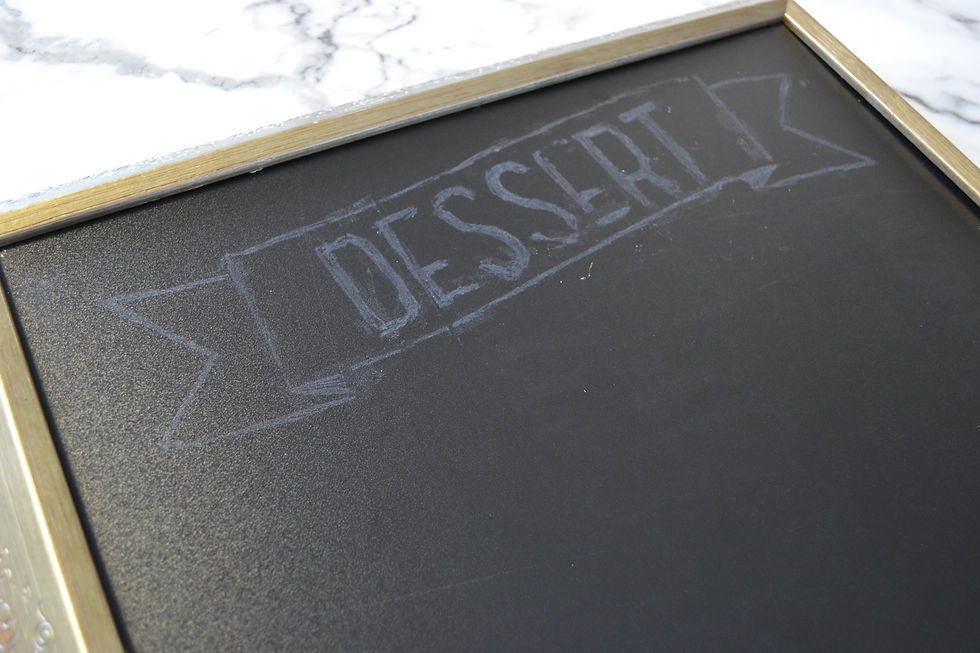
Pull of your paper template and you have a rough sketch of your design. The dust from the chalk is transferred on to the board as you traced the design with your pencil.
Step four:
Use your chalk marker to go over your rough sketch. Do this in a well lit room, because the chalk might be quite faint. Sometimes I’ll shine a lamp or my phone right over it to see the more intricate parts. Once the marker ink is dried, go ahead and lightly dust off any excess chalk dust. Then, congratulations, you’re done! What a beautiful chalkboard you’ve made!

is it simple and easy? YES. Can it be time consuming? Depending on how complex your design is, yes… but the end result is so gorgeous and professional looking! I’d love to hear if you tried this technique out! Leave me a comment or find me on Facebook to let me know how it went! Happy DIY-ing!


Comments